 The water cooling technology was built into IBM's 3D chips
Enlarge Image
A network of tiny pipes of water could be used to cool next-generation PC chips, researchers at IBM have said.
Scientists at the firm have shown off a prototype device layered with thousands of "hair-width" cooling arteries.
They believe it could be a solution to the increasing amount of heat pumped out by chips as they become smaller and more densely packed with components.
The technology was demonstrated in IBM's 3D chips, where circuits are stacked one on top of the other.
Laying chips vertically, instead of side by side, reduces the distance data has to travel , enhancing performance and saving critical space.
"As we package chips on top of each other....we have found that conventional coolers attached to the back of a chip don't scale," explained Thomas Brunschwiler at IBM's Zurich Research Laboratory.
"In order to exploit the potential of high-performance 3D chip stacking, we need interlayer cooling."
Cool running
Heat is seen as one of the major hurdles of producing ever smaller and quicker chips.
3D chip
It took IBM a decade to work out how to build 3D chips
It is the by-product of the movement of electrons through the tiny wires connecting the millions of components on a modern processor.
As more and more components are packed on to chips - Intel recently launched a processor with two billion transistors, for example - the problems become worse.
As a result, researchers around the world are engaged in a search for the most efficient way to take the heat off the chip industry.
For example, in 2007, US researchers built tiny wind engines that created a "breeze" made up of charged particles, or ions, to cool computer chips.
But the problems are exacerbated in the multi-storey chips which IBM, as well as others, believe offer "one of the most promising approaches" for building future processors.
Each 4cm sq sandwich is just 1mm thick but pumps out close to 1kilowatt - 10 times that generated by a hotplate.
Conventional cooling techniques such as fans and heat sinks do not work as well with the 3D technology, particularly as heat has to be drawn away from between the individual chips.
To get around this, researchers piped water through sealed tubes just 50 microns (millionths of a metre) in diameter, between individual layers.
Water is much more efficient than air at absorbing heat and so even with tiny amounts of liquid flowing through the system the researchers saw a significant effect.
The idea of pumping liquids around computers is not entirely new. Early mainframe computers had water pumped around them.
High end computers have been "modded" for a number of years with water coolers and various researchers and companies have put forward proposals for directly cooling chips with fluids.
In 2003, Stanford University spin-out company Cooligy showed off its Active Micro-Channel Cooling (AMC) technology which allowed fluids to circulate through hundreds of tiny channels on the upper surface of a chip.
The technology was used in some versions of Apple's Power Mac G5 desktop computer, released in 2004.
IBM has said its water-cooling technology could be in products within five years.
The water cooling technology was built into IBM's 3D chips
Enlarge Image
A network of tiny pipes of water could be used to cool next-generation PC chips, researchers at IBM have said.
Scientists at the firm have shown off a prototype device layered with thousands of "hair-width" cooling arteries.
They believe it could be a solution to the increasing amount of heat pumped out by chips as they become smaller and more densely packed with components.
The technology was demonstrated in IBM's 3D chips, where circuits are stacked one on top of the other.
Laying chips vertically, instead of side by side, reduces the distance data has to travel , enhancing performance and saving critical space.
"As we package chips on top of each other....we have found that conventional coolers attached to the back of a chip don't scale," explained Thomas Brunschwiler at IBM's Zurich Research Laboratory.
"In order to exploit the potential of high-performance 3D chip stacking, we need interlayer cooling."
Cool running
Heat is seen as one of the major hurdles of producing ever smaller and quicker chips.
3D chip
It took IBM a decade to work out how to build 3D chips
It is the by-product of the movement of electrons through the tiny wires connecting the millions of components on a modern processor.
As more and more components are packed on to chips - Intel recently launched a processor with two billion transistors, for example - the problems become worse.
As a result, researchers around the world are engaged in a search for the most efficient way to take the heat off the chip industry.
For example, in 2007, US researchers built tiny wind engines that created a "breeze" made up of charged particles, or ions, to cool computer chips.
But the problems are exacerbated in the multi-storey chips which IBM, as well as others, believe offer "one of the most promising approaches" for building future processors.
Each 4cm sq sandwich is just 1mm thick but pumps out close to 1kilowatt - 10 times that generated by a hotplate.
Conventional cooling techniques such as fans and heat sinks do not work as well with the 3D technology, particularly as heat has to be drawn away from between the individual chips.
To get around this, researchers piped water through sealed tubes just 50 microns (millionths of a metre) in diameter, between individual layers.
Water is much more efficient than air at absorbing heat and so even with tiny amounts of liquid flowing through the system the researchers saw a significant effect.
The idea of pumping liquids around computers is not entirely new. Early mainframe computers had water pumped around them.
High end computers have been "modded" for a number of years with water coolers and various researchers and companies have put forward proposals for directly cooling chips with fluids.
In 2003, Stanford University spin-out company Cooligy showed off its Active Micro-Channel Cooling (AMC) technology which allowed fluids to circulate through hundreds of tiny channels on the upper surface of a chip.
The technology was used in some versions of Apple's Power Mac G5 desktop computer, released in 2004.
IBM has said its water-cooling technology could be in products within five years.
DIRECTLY TO
 |  |  |  |
YOUTHSPROUTS

Today and Tomorrow is Ours
Friday, June 06, 2008
Tuesday, May 13, 2008
100 th bithday to cell phone
History has forgotten Nathan Stubblefield, but thanks to the arrival of the 100th anniversary of his then-pioneering invention, the man's finally receiving his due.
In 1908 Stubblefield had the idea to use a complicated rig of wire and large poles set up around a train track, road, or river. When a train, vehicle, or boat traveled past the wires, a transmitting device on the vehicle would send an audio signal to a receiving device in the distance using magnetic waves.
A patent was granted for the device on May 9 of that year, which some are now crediting as the first wireless communications device ever. To wit, Virgin Mobile is honoring Stubblefield on the centennial of the patent with a set of web pages about the man. (Click through the photo gallery to get a better idea of how such a device worked. It's really pretty fascinating.)
Unfortunately, Stubblefield's invention wasn't entirely practical. The transmitter and receiver were enormous and far from portable (see picture), and they required so much wire that it would have been considerably more efficient to simply run the wire between the two transmitters instead of using wireless communications.
Still, it's nice to remember Stubblefield as a pioneer in a field that, at the time, few felt would have much of a future. History has of course shown of course that Stubblefield was on to something bigger than he knew: Harris Interactive's latest poll shows that 14 percent of adults use a cell phone exclusively at home now, sans land line.
Post
Friday, May 02, 2008
MENU MAKING IS LOT EASY FROM NOW.
Create more advanced, complex and exciting DHTML Menus with the press of a button by using the NEW “Multiple Rows and Columns” feature. added in the Group Style Editor’s <Type> property in AllWebMenus!
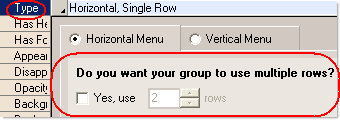
Examples:
Multiple Rows: 
Multiple Columns: 
Note: In this demonstration AllWebMenus DHTML Menu Maker version 5.1 build #734 was used.
The choice of AllWebMenus as your DHTML menu / JavaScript menu maker offers you the highest possible standards and qualifications :
: - Powerful customization (hundreds of combinations) View examples of menus
- Cross-browser support

- Addins/extensions for popular html editors
(view entire list)

- All UNICODE languages/symbols fully supported (international menus) new!
- Floating Images - Use this feature as extra decoration for a special occasion (anniversary, holiday etc) or as a part of a theme
- Multiple Column/Row menus
- Use HTML code on selected menu items to achieve enhanced formatting or advanced functionality
- Database-driven or programmatically generated menus on server-side environments, such as PHP, JSP, ColdFusion, ASP, ASP.NET, etc. (Server-Side Menus API)
- Web menu Theme Packs and Templates
- SEO (search engine optimized) menu implementations
- Innovative User Interface - Simplicity and ease of use
- Continuous upgrades and company commitment, accurate customer support
View complete features list as well as examples of menus you can create with our DHTML menu generator.
Floating Images can now be added to any of the items of your DHTML menu, allowing for even more creative menu implementations.
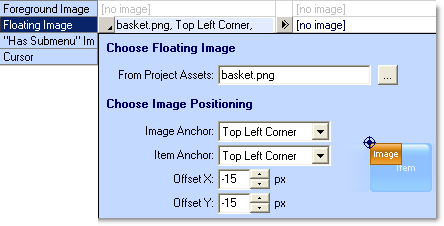
- The fact that a “floating image” appears above the item’s layer gives it the opportunity to exceed the item’s area!
- Have a look at the following examples, where we have decorated one menu for Christmas and another for the Basketball’s finals by just adding a “floating image” on the items you want and for any of the three states of the menu (Normal, Mouse Over or Mouse Click):

AND

Saturday, April 19, 2008
Nano switch hints at future chips

Researchers have built the world's smallest transistor - one atom thick and 10 atoms wide - out of a material that could one day replace silicon.
The transistor, essentially an on/off switch, has been made using graphene, a two-dimensional material first discovered only four years ago.
Graphene is a single layer of graphite, which is found in the humble pencil.
The transistor is the key building block of microchips and the basis for almost all electronics.
Dr Kostya Novoselov and Professor Andre Geim from The School of Physics and Astronomy at The University of Manchester have been leading research into the potential application of graphene in electronics and were the first to separate a sheet of the material from graphite
Super material
Graphene has been hailed as a super material because it has many potential applications. It is a flat molecule, with only the thickness of an atom, and both very stable and robust.
The researchers are also looking at its use in display technology - because it is transparent.
The Manchester-based scientists have shown that graphene can be carved into tiny electronic circuits with individual transistors not much larger than a molecule.
Dr Novoselov told BBC News that graphene had many advantages over silicon because it could conduct electricity faster and further.
Friday, April 18, 2008
WHAT IS GREASEMONKEY AND WHAT IS MEAN TO GMAIL AND OTHERS?
www.youthsprouts.blogspot.com Enhance your web experience with Greasemonkey You may come across Greasemonkey scripts which does something useful but are clueless what the heck is Greasemonkey. If you already know about Greasemonkey, well go ahead and check out some other post on my blog, but if you don't know read on. Greasemonkey is a FireFox extension which once installed in FireFox lets you install scripts that make changes to Web Pages. Many times you wish for some feature while browsing your favorite site which isn't there. Like a download link to download videos when you browse YouTube. Install a Greasemonkey script and you'll have that feature. There are thousands of scripts available for various websites and if you know a bit of coding, you can build your own script. The summary is, Greasemonkey provides you with additional functionality for any web page by making on the fly changes to it. And as the scripts are persistent, the changes made to the web page are permanent. So what's you are waiting for. Go ahead and install this awesome extension and add that little feature to your favorite web page you were always wishing for. Download Greasemonkey Find thousands of Greasemonkey scripts Build your own Greasemonkey script. Tutorial and guide
How to create Firefox extension from Greasemonkey scripts
 Here's an online tool which converts a Greasemonkey script into a FireFox extension (XPI). Its very easy to use, just enter details like GUID, creator name, extension version etc and copy paste the content of the user script and hit the 'Compile' button. The XPI file would be available for download immediately. Once you install the extension into Firefox, you can take advantage of the script even without Greasemonkey.
__
Here's an online tool which converts a Greasemonkey script into a FireFox extension (XPI). Its very easy to use, just enter details like GUID, creator name, extension version etc and copy paste the content of the user script and hit the 'Compile' button. The XPI file would be available for download immediately. Once you install the extension into Firefox, you can take advantage of the script even without Greasemonkey.
__
Sony Ericsson XPERIA X1 , Looks impressive
www.youthsprouts.blogspot.com

 Its display size is 800 x 480 pixels, 3 inches. with 65K colors and TFT touchscreen. Has an internal memory of 400 MB and runs on Microsoft Windows Mobile 6.0 Professional. It looks very impressive with its distinctive Arc slider design. Other features include Truly mobile internet, RSS feeds, Multiple navigation, Handwriting Recognition, Wi-Fi support etc.
Full specifications here
X1 Overview
Watch the XPERIA X1 hands on MWC 2008 Barcelona Video
Its display size is 800 x 480 pixels, 3 inches. with 65K colors and TFT touchscreen. Has an internal memory of 400 MB and runs on Microsoft Windows Mobile 6.0 Professional. It looks very impressive with its distinctive Arc slider design. Other features include Truly mobile internet, RSS feeds, Multiple navigation, Handwriting Recognition, Wi-Fi support etc.
Full specifications here
X1 Overview
Watch the XPERIA X1 hands on MWC 2008 Barcelona Video
- 110.0 x 17.0 x 53.0 mm
- 4.3 x 0.7 x 2.1 inches
- 145.0 gr
- 5.1 oz

- 800 X 480
- 65,536 color TFT
- Up to 400 MB Phone Memory
- MicroSD support
- GSM 850
- GSM 900
- GSM 1800
- GSM 1900
- EDGE
- HSDPA
- HSUPA
- UMTS 850
- UMTS 900
- UMTS 1700
- UMTS 1900
- UMTS 2100
Monday, April 14, 2008
Plantronics Voyager 510 USB Bluetooth headset--- for skype
www.youthsprouts.blogspot.com
Photo
Plantronics sent me their Click for Amazon price:
Plantronics Voyager 510 Bluetooth Headset with Multipoint Technology [Retail Packaged]
Buy Now', STICKY, TIMEOUT, 6000);" onmouseout="return nd();">Voyager 510 Bluetooth headset to review. Unlike any other Bluetooth headsets, the Plantronics Voyager 510 USB Bluetooth headset is the first to simultaneously support both VoIP softphones on your PC and your Bluetooth mobile phone simultaneously -- negating the need to deregister/re-register your Bluetooth connection with the other device. Plantronics is able to do this using their exclusive Multipoint Technology.
Measuring 4.0 x 2.5 x 0.8 inches and weighing 5.6 ounces, the Plantronic Voyager 510 headset is pretty lightweight - after awhile you don't even notice it is there. It is slightly heavier and bulkier than the Click for Amazon price:
Motorola HS850 Bluetooth Headset [Bulk Packaged]
Buy Now', STICKY, TIMEOUT, 6000);" onmouseout="return nd();">Motorola HS850 , but I found the Voyager 510-USB much more comfortable on my ear. The Motorola HS850 would often dangle and not stay put.
Many PCs or even laptops don't have built-in Bluetooth, but fortunately, the Voyager 510 USB includes a plug and play Bluetooth USB adapter that works without the need for any software drivers. This enables mobile professionals to engage in one-step hands-free VoIP calling. If you want the ability to perform remote-end answer/hang-up integration with softphones you'll need to install the PerSonoCall application.
 The system integrates with enterprise softphone software from leading companies — including Avaya, Cisco, Nortel, Skype, and others — to offer call notification and remote call answering through the headset. It also is compatible with most popular consumer VoIP services, like AOL, MSN, and Yahoo! although it doesn't feature remote call answer with these yet. I tested the ability to remotely answer incoming Skype calls from the 510-USB and it worked without a hitch. On an incoming Skype call from Greg Galitzine I simply pressed the call control button on the 510-USB and the Skype call was accepted. Beauty, eh?
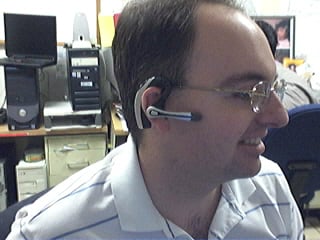 Profile of the Plantronics Voyager 510 USB Bluetooth Headset
The headset's "smart" technology knows which Bluetooth device you are using and allows you to take calls from any device simply by hitting the button. With the optional Plantronics Bluetooth Deskphone Adapter you can even switch between your office phone and your Bluetooth mobile phone. Thus, you won't need to use a dedicated "landline" phone headset.
The 510 headset features a noise-canceling microphone for clearer conversations and the mic boom swivels to position on either ear. The 510 supports adaptive frequency hopping (AFH) which helps avoid interference from WiFi networks. It supports a hefty 6 hours talk time using the built-in Lithium polymer rechargeable battery and up to 100 hours of standby time.
Profile of the Plantronics Voyager 510 USB Bluetooth Headset
The headset's "smart" technology knows which Bluetooth device you are using and allows you to take calls from any device simply by hitting the button. With the optional Plantronics Bluetooth Deskphone Adapter you can even switch between your office phone and your Bluetooth mobile phone. Thus, you won't need to use a dedicated "landline" phone headset.
The 510 headset features a noise-canceling microphone for clearer conversations and the mic boom swivels to position on either ear. The 510 supports adaptive frequency hopping (AFH) which helps avoid interference from WiFi networks. It supports a hefty 6 hours talk time using the built-in Lithium polymer rechargeable battery and up to 100 hours of standby time.
 Front View of the Voyager 510 USB Bluetooth Headset
When you place the headset on the charging base, it automatically turns off the headset and charges it. Fortunately, when you remove the Voyager 510 from the charging base it remembers to turn it back on. Similarly, if you manually shut off the headset (depress power switch for 3s) and then place it on the charger, if you remove the headset from the base, the headset stays off. I wonder if the headset isn't truly "off" when you place the Voyager headset onto the charging base while it is still on? It's probably in a pseudo-sleep mode, but not totally powered off. The difference in charging the battery is probably negligible, so most users will probably keep the headset always turned on even when charging.
Front View of the Voyager 510 USB Bluetooth Headset
When you place the headset on the charging base, it automatically turns off the headset and charges it. Fortunately, when you remove the Voyager 510 from the charging base it remembers to turn it back on. Similarly, if you manually shut off the headset (depress power switch for 3s) and then place it on the charger, if you remove the headset from the base, the headset stays off. I wonder if the headset isn't truly "off" when you place the Voyager headset onto the charging base while it is still on? It's probably in a pseudo-sleep mode, but not totally powered off. The difference in charging the battery is probably negligible, so most users will probably keep the headset always turned on even when charging.
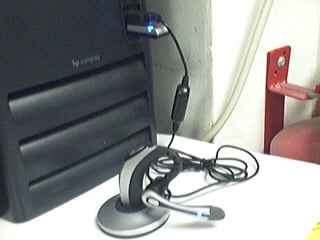 Plantronics USB 510 charging base connected to 1 USB port.
Bluetooth dongle connected to PC's 2nd USB port
Button functionality & testing
I had some minor difficulties with the power on/off switch which is very small and located just in front of the volume buttons, and it requires a very hard press. When the headset is on your ear, making a hard button press took a little getting used to. In any case, there are basically three buttons on the headset. The first button is simply a +/- volume button, which happens to be the largest of the three making it easy to adjust the volume.
The 2nd button on the 510 is the small black button I mentioned which toggles the power button (and mute with a quick depress). The power button requires you hold the button for 3s to toggle the power. Well, they advertise in the manual that it's 3 seconds, but I tested it and it's actually 3s to turn on and just 2-2.5s to turn off. The 3s is a tad long to turn on, but useful I suppose to prevent accidentally turning on or off the headset. Of course, like I said, you have to press the power button pretty hard, so I doubt it would be pressed by accident. It probably has more to do with the time it takes to negotiate a connection with the other Bluetooth devices.
The 3rd button on the Voyager is placed where the boom mic meats the ear piece and it is used to call answer or end the call, as well as toggle between your PC Bluetooth connection and your Bluetooth mobile phone. It is also used to activate voice dialing, redial, and other functions.
To activate last number redial you simply double click the call control button. You will hear a high tone for each key press. When you hear a further tone, the last number has been redialed. In addition, when receiving an incoming call you can press and hold the call control button to reject a call. You will hear a tone. When you hear a second tone, the call has been rejected and you can release the button.
Voice Dialing & Call Transfer to other BT device
You can easily perform voice dialing supported by your mobile phone by pressing and holding the call control button for 2 seconds until you hear a second tone. Then you can speak the name of the person you wish to reach. Switching a call from your mobile phone to the headset is pretty straightforward. You simply briefly press the call control button. Switching a call from the headset back to the phone requires a slighly longer button press until you hear a tone indicating the transfer has been complete. I was able to listen to streaming music on the 510-USB, hear beeps in the headset that an incoming call was coming in, and then press the call control to answer the call.
Features
Plantronics USB 510 charging base connected to 1 USB port.
Bluetooth dongle connected to PC's 2nd USB port
Button functionality & testing
I had some minor difficulties with the power on/off switch which is very small and located just in front of the volume buttons, and it requires a very hard press. When the headset is on your ear, making a hard button press took a little getting used to. In any case, there are basically three buttons on the headset. The first button is simply a +/- volume button, which happens to be the largest of the three making it easy to adjust the volume.
The 2nd button on the 510 is the small black button I mentioned which toggles the power button (and mute with a quick depress). The power button requires you hold the button for 3s to toggle the power. Well, they advertise in the manual that it's 3 seconds, but I tested it and it's actually 3s to turn on and just 2-2.5s to turn off. The 3s is a tad long to turn on, but useful I suppose to prevent accidentally turning on or off the headset. Of course, like I said, you have to press the power button pretty hard, so I doubt it would be pressed by accident. It probably has more to do with the time it takes to negotiate a connection with the other Bluetooth devices.
The 3rd button on the Voyager is placed where the boom mic meats the ear piece and it is used to call answer or end the call, as well as toggle between your PC Bluetooth connection and your Bluetooth mobile phone. It is also used to activate voice dialing, redial, and other functions.
To activate last number redial you simply double click the call control button. You will hear a high tone for each key press. When you hear a further tone, the last number has been redialed. In addition, when receiving an incoming call you can press and hold the call control button to reject a call. You will hear a tone. When you hear a second tone, the call has been rejected and you can release the button.
Voice Dialing & Call Transfer to other BT device
You can easily perform voice dialing supported by your mobile phone by pressing and holding the call control button for 2 seconds until you hear a second tone. Then you can speak the name of the person you wish to reach. Switching a call from your mobile phone to the headset is pretty straightforward. You simply briefly press the call control button. Switching a call from the headset back to the phone requires a slighly longer button press until you hear a tone indicating the transfer has been complete. I was able to listen to streaming music on the 510-USB, hear beeps in the headset that an incoming call was coming in, and then press the call control to answer the call.
Features
- Multipoint Technology allows you to seamlessly switch between two Bluetooth devices
- Noise-canceling microphone for superior sound quality
- Up to 6 hours talk time and up to 100 hours standby time
- One-touch call answer/end, last number redial and voice activated dialing
- Compatible with Bluetooth devices supporting the headset or hands-free profile
- Noise-canceling microphone and wind-reduction technology for brilliant sound both indoors and out;
- Lightweight, foldable design for all-day comfort and easy storage;
- Boom swivels for use on either ear;
- 33-foot roaming distance. feet away from voice-enabled Bluetooth devices
Plantronics Voyager 510 Bluetooth Headset with Multipoint Technology [Retail Packaged]
Buy Now', STICKY, TIMEOUT, 6000);" onmouseout="return nd();">Voyager 510 USB Bluetooth headset is available on Amazon for just $47.99 if you just need the headset to have access to a Bluetooth mobile phone. If you need the optional USB Bluetooth dongle/transmitter for PC-connectivity (VoIP, iTunes, other sound apps) then you can also Click for Amazon price:
Plantronics Voyager 510S Bluetooth Headset System
Buy Now', STICKY, TIMEOUT, 6000);" onmouseout="return nd();">pick it up on Amazon for about $179 (originally $299). Some PC's come with Bluetooth adaptors, or you may already have a USB Bluetooth dongle - though I'm not sure how well Plantronic's multipoint technology works if you use a 3rd party Bluetooth dongle. Best bet is to pay the $179 for both the headset and the Plantronics USB Bluetooth adaptor. __
Sunday, April 13, 2008
Dell vs Apple
www.youthsprouts.blogspot.com y brother has a Dell Inspiron, my sister has an Apple Macbook. The inspiron has a Dell Wireless 1390 or Intel Wireless 3945 card, while the Macbook has AirPort Extreme Wi-Fi 802.11 a/b/g/n. The other night we were all playing an online game, with mixed results. They share a DSL connection to the internet, while I measured their latency over time from my Verizon FIOS:

Looking at the box-plots for my brother, who has the Dell, he is spending about 50% of his time experiencing latencies up to twice as bad as they should be, while my sister is getting decent, consistent Wireless performance. I don’t know if it’s environmental to their home, or something else, but what’s causing such bad performance for my brother? Does Dell just suck that much?
__
Saturday, April 12, 2008
GE FORCE 9800GX2 ZOTAC
www.youthsprouts.blogspot.com
 The respective SLI setups were tested with the same benchmarks that we have used so far so as to give us a fair indication of how much the cards scale and also how they fair as compared to the 9800GX2. Also, we couldn't just change all our benchmarks as we needed to compare the results to the cards that we've tested previously as well. We might be able to squeeze in a few newer benchmarks from the next graphics card article and gradually shift completely to the newer set.
What to Expect??
The respective SLI setups were tested with the same benchmarks that we have used so far so as to give us a fair indication of how much the cards scale and also how they fair as compared to the 9800GX2. Also, we couldn't just change all our benchmarks as we needed to compare the results to the cards that we've tested previously as well. We might be able to squeeze in a few newer benchmarks from the next graphics card article and gradually shift completely to the newer set.
What to Expect??

Micro Technologies Rolls Out ‘Software’ To Locate Stolen NBs.India’s first laptop tracking system
Mumbai based Micro Technologies Ltd has made announcement about the  launching of India’s first laptop tracking system, which will locate stolen laptop computers.
The newly launched software known as “Micro LNTS” (Lost Notebook Tracking System) can be installed on notebook hard drives where it subsequently works in stealth mode.
In case of theft, it permits systems to be tracked as soon as they are connected to the World Wide Wed (WWW). The users can log into their Web-based personal tracking and monitoring page via www.microInts.net in order to trace from where the laptop has been accessed.
Dr. P. Sekhar, chairman and managing director of Micro Technologies, said, “LNTS is just the incidental name. It is also a manageability tool for files and folders as well as a parental control system for tracking the online activities done by children. The system can be used to keep a check on the number of hours children spend on the Internet and what kind of websites they visit.”
The software also provides other management tools including sending out regular emails for notebook activity, hide the documents containing important data, date-wise data storage, login intimation on mobile and email, remotely monitoring of user specified URL/Document, and getting the list of installed software.
But it should be remembered that LNTS is not fool-proof like other software tools. If a thief formats the hard drive of the notebook before connecting to the Internet, the software will be deleted from the system.
The software is available in 3 different models including LNTS- Elite and Premium for individual users, and Micro LNTS-Corporate Micro LNTS. The Elite model is priced at Rs. 600, whereas the Premium costs Rs 1500.
The stock of the company, on Friday (April 11), marked its closure at Rs 277.55, up 1.1% on the Bombay Stock exchange (BSE).
__Friday, April 11, 2008
Samsung SPH-P9000 WiMax Phone Unveiled--- a cool phone
 Samsung today unveiled the SPH-P9000 Deluxe MITs, the latest in mobile convergence device. Introduced at the Mobile WiMax Summit 2006, the SPH-P9000 ushers in the new era of mobile convergence technology, capable of voice and multimedia data communications through Mobile WiMax technology.
The SPH-P9000 is a PDA-based device utilizing Mobile WiMax and CDMA EV-DO connectivity for wireless access to the Internet and simultaneously providing mobile phone connection for voice communication.
With Microsoft Windows XP as the operating system, users will find the contents and applications familiar and easy to use for work and play. Integrating a QWERTY keyboard, the SPH-P9000 offers painless typing and internet surfing, while the MP3 player function, VOD, and camera function provide a quick access to multimedia entertainment.
The 5.0-inch WVGA screen is prepared for movie and document viewing, while the 30 GB hard drive stores music, movies, and documents. All of these unique features are combined into one device that weighs in at a little over one pound. The SPH-P9000 will be launched in Korea first half of 2007.
Samsung SPH-P9000 Specifications
- Standard: Mobile WiMax / CDMA 1x EV-DO
- Camera: 1.3-Megapixel Camera
- Display: 5-inch WVGA LCD
- 1 GHz (Transmeta) CPU
- QWERTY Keyboard
- Bluetooth (Class 1) with BT Messenger
- MiniUSB / 24 pin Connector
- Extended I/O Pack
- 2980 mAh / 7200 mAh Battery
- 30 GB Embedded
- Size: 143 x 92 x 29.7 mm
- Weight: 560 g
__
Samsung today unveiled the SPH-P9000 Deluxe MITs, the latest in mobile convergence device. Introduced at the Mobile WiMax Summit 2006, the SPH-P9000 ushers in the new era of mobile convergence technology, capable of voice and multimedia data communications through Mobile WiMax technology.
The SPH-P9000 is a PDA-based device utilizing Mobile WiMax and CDMA EV-DO connectivity for wireless access to the Internet and simultaneously providing mobile phone connection for voice communication.
With Microsoft Windows XP as the operating system, users will find the contents and applications familiar and easy to use for work and play. Integrating a QWERTY keyboard, the SPH-P9000 offers painless typing and internet surfing, while the MP3 player function, VOD, and camera function provide a quick access to multimedia entertainment.
The 5.0-inch WVGA screen is prepared for movie and document viewing, while the 30 GB hard drive stores music, movies, and documents. All of these unique features are combined into one device that weighs in at a little over one pound. The SPH-P9000 will be launched in Korea first half of 2007.
Samsung SPH-P9000 Specifications
- Standard: Mobile WiMax / CDMA 1x EV-DO
- Camera: 1.3-Megapixel Camera
- Display: 5-inch WVGA LCD
- 1 GHz (Transmeta) CPU
- QWERTY Keyboard
- Bluetooth (Class 1) with BT Messenger
- MiniUSB / 24 pin Connector
- Extended I/O Pack
- 2980 mAh / 7200 mAh Battery
- 30 GB Embedded
- Size: 143 x 92 x 29.7 mm
- Weight: 560 g
__
WiMAX-enabled VoIP phone showcased at Mobile World Congress
www.youthsprouts.blogspot.com


 Ridiculous quantities of 3G handsets weren't the only things showed off at this year's Mobile World Congress -- oh no, NetIndex, Kaga Electronics and Runcom shook up the norm a bit with their WiMAX-enabled portable VoIP phone. Reportedly, the trio joined forces to develop a VoIP handset that utilized a 802.16e module, and aside from "realizing all-IP voice communication," it also sports a web browser and integrated WiFi for times when a plain ole hotspot will do. Sadly, we've no idea where this thing will go after it leaves Barcelona (nor what it looks like), but here's to hoping it makes a commercial debut -- and can decide on a single logo -- in the not-too-distant future.
__
Ridiculous quantities of 3G handsets weren't the only things showed off at this year's Mobile World Congress -- oh no, NetIndex, Kaga Electronics and Runcom shook up the norm a bit with their WiMAX-enabled portable VoIP phone. Reportedly, the trio joined forces to develop a VoIP handset that utilized a 802.16e module, and aside from "realizing all-IP voice communication," it also sports a web browser and integrated WiFi for times when a plain ole hotspot will do. Sadly, we've no idea where this thing will go after it leaves Barcelona (nor what it looks like), but here's to hoping it makes a commercial debut -- and can decide on a single logo -- in the not-too-distant future.
__
Friday, April 04, 2008
Robot space truck docks with ISS

Station camera shows moment ATV docks with ISS
Europe's sophisticated new space truck, the ATV, has docked with the International Space Station (ISS).
The unmanned vessel carries just under five tonnes of food, water, air, fuel and equipment for the orbiting platform's three astronauts.
The Automated Transfer Vehicle used its own computerised systems to make the attachment at 1445 GMT.
Ground control and the ISS crew were on alert just in case there was a problem - but it was a textbook docking.
Post
__
Monday, March 31, 2008
Worlds First Pocket sixe DJ System--- youthsprouts.blogspot.com
Swedish tech company Tonium Laboratories unveil the Pacemaker, the world’s first professional pocket-sized DJ system, first of its kind anywhere in the world.

For the first time in history, everyone can have the power to create their own music. Imagine walking into a party with every record you own in your pocket, stored on the huge 120GB Pacemaker hard drive, plugging into the nearest sound system and DJ’ing like a professional. Envision the next time you’re on a bus or subway, instead of simply listening to your music you can completely interact with it, creating mixes of your favorite tunes, beat matching and using effects; the possibilities are only limited by your own imagination.
__MICROSOFT TOCHY TABLE, COOL AND REALLY FRIENDLY
www.youthsprouts.blogspot.com
Microsoft has just unveiled a new technology called Microsoft Surface. A Surface computer is able to recognize physical objects from a paintbrush to a cell phone and allows hands-on, direct control of content such as photos, music and maps. Surface turns an ordinary tabletop into a dynamic surface that provides interaction with all forms of digital content through natural gestures, touch and physical objects. But don’t let me spoil all the fun, there is a great Popular Mechanics video embedded below. Have a look, i think you’ll like it. As well as a couple of great promotional videos on Microsoft Surface website.
BEST VIDEOS
www.youthsprouts.blogspot.com
Photo
Good Husband Mona Lisa in MS Paint iPhone: The Music Video What We Are
Saturday, March 29, 2008
DIGITAL CANDLE


Everyone has a fond memory of turning off electricity and lighting a candle. One can enjoy the mysterious yet peaceful and comforting ambience radiating from a small, flickering luminance that is often absent in modern lighting apparatus. A light switch in a room does not add any aesthetic value to interior design to the room. Switch Candle brings back the fond memory, adding not only to the interior design but providing a soothing ambience in the dark room.
The small holes at the top of the switch are designed to assume a candle’s wick when LED is on. When the user blows on the holes, it activates a sensor which discriminates the degree of airflow. Gentle airflow makes the LED flicker as if real candle flame dances in air. Strong airflow turns the LED off, effectively granting the user a sense of blowing a candle off.
__
PHONES IS TRANSPARENT NOW
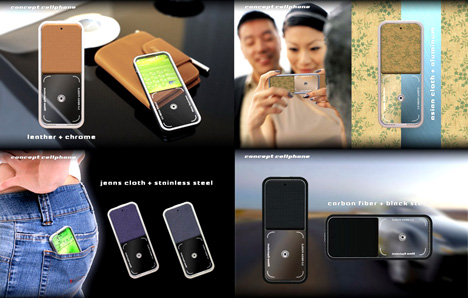
Pei-Hua Huang is an Industrial Design grad of NC State University. “What You See Is What You Get” is Huang’s latest concept project. The purpose of this project is to look for farther possibilities of future CELL PHONES. With the 50mm equivalent camera module, this cell phone no long depends on the screen while taking pictures. By using the transparent frame as viewfinder, “What You See Is What You Get.”
Designer: Pei-Hua Huang

__
Earn $$ with WidgetBucks


