



www.youthsprouts.blogspot.com
Photo
 Plantronics sent me their Click for Amazon price:
Plantronics Voyager 510 Bluetooth Headset with Multipoint Technology [Retail Packaged]
Buy Now', STICKY, TIMEOUT, 6000);" onmouseout="return nd();">Voyager 510 Bluetooth headset to review. Unlike any other Bluetooth headsets, the Plantronics Voyager 510 USB Bluetooth headset is the first to simultaneously support both VoIP softphones on your PC and your Bluetooth mobile phone simultaneously -- negating the need to deregister/re-register your Bluetooth connection with the other device. Plantronics is able to do this using their exclusive Multipoint Technology.
Measuring 4.0 x 2.5 x 0.8 inches and weighing 5.6 ounces, the Plantronic Voyager 510 headset is pretty lightweight - after awhile you don't even notice it is there. It is slightly heavier and bulkier than the Click for Amazon price:
Motorola HS850 Bluetooth Headset [Bulk Packaged]
Buy Now', STICKY, TIMEOUT, 6000);" onmouseout="return nd();">Motorola HS850 , but I found the Voyager 510-USB much more comfortable on my ear. The Motorola HS850 would often dangle and not stay put.
Many PCs or even laptops don't have built-in Bluetooth, but fortunately, the Voyager 510 USB includes a plug and play Bluetooth USB adapter that works without the need for any software drivers. This enables mobile professionals to engage in one-step hands-free VoIP calling. If you want the ability to perform remote-end answer/hang-up integration with softphones you'll need to install the PerSonoCall application.
 The system integrates with enterprise softphone software from leading companies — including Avaya, Cisco, Nortel, Skype, and others — to offer call notification and remote call answering through the headset. It also is compatible with most popular consumer VoIP services, like AOL, MSN, and Yahoo! although it doesn't feature remote call answer with these yet. I tested the ability to remotely answer incoming Skype calls from the 510-USB and it worked without a hitch. On an incoming Skype call from Greg Galitzine I simply pressed the call control button on the 510-USB and the Skype call was accepted. Beauty, eh?
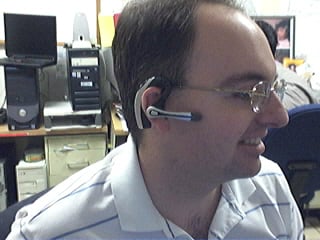 Profile of the Plantronics Voyager 510 USB Bluetooth Headset
The headset's "smart" technology knows which Bluetooth device you are using and allows you to take calls from any device simply by hitting the button. With the optional Plantronics Bluetooth Deskphone Adapter you can even switch between your office phone and your Bluetooth mobile phone. Thus, you won't need to use a dedicated "landline" phone headset.
The 510 headset features a noise-canceling microphone for clearer conversations and the mic boom swivels to position on either ear. The 510 supports adaptive frequency hopping (AFH) which helps avoid interference from WiFi networks. It supports a hefty 6 hours talk time using the built-in Lithium polymer rechargeable battery and up to 100 hours of standby time.
Profile of the Plantronics Voyager 510 USB Bluetooth Headset
The headset's "smart" technology knows which Bluetooth device you are using and allows you to take calls from any device simply by hitting the button. With the optional Plantronics Bluetooth Deskphone Adapter you can even switch between your office phone and your Bluetooth mobile phone. Thus, you won't need to use a dedicated "landline" phone headset.
The 510 headset features a noise-canceling microphone for clearer conversations and the mic boom swivels to position on either ear. The 510 supports adaptive frequency hopping (AFH) which helps avoid interference from WiFi networks. It supports a hefty 6 hours talk time using the built-in Lithium polymer rechargeable battery and up to 100 hours of standby time.
 Front View of the Voyager 510 USB Bluetooth Headset
When you place the headset on the charging base, it automatically turns off the headset and charges it. Fortunately, when you remove the Voyager 510 from the charging base it remembers to turn it back on. Similarly, if you manually shut off the headset (depress power switch for 3s) and then place it on the charger, if you remove the headset from the base, the headset stays off. I wonder if the headset isn't truly "off" when you place the Voyager headset onto the charging base while it is still on? It's probably in a pseudo-sleep mode, but not totally powered off. The difference in charging the battery is probably negligible, so most users will probably keep the headset always turned on even when charging.
Front View of the Voyager 510 USB Bluetooth Headset
When you place the headset on the charging base, it automatically turns off the headset and charges it. Fortunately, when you remove the Voyager 510 from the charging base it remembers to turn it back on. Similarly, if you manually shut off the headset (depress power switch for 3s) and then place it on the charger, if you remove the headset from the base, the headset stays off. I wonder if the headset isn't truly "off" when you place the Voyager headset onto the charging base while it is still on? It's probably in a pseudo-sleep mode, but not totally powered off. The difference in charging the battery is probably negligible, so most users will probably keep the headset always turned on even when charging.
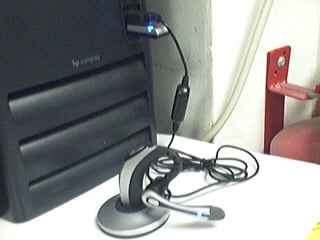 Plantronics USB 510 charging base connected to 1 USB port.
Bluetooth dongle connected to PC's 2nd USB port
Button functionality & testing
I had some minor difficulties with the power on/off switch which is very small and located just in front of the volume buttons, and it requires a very hard press. When the headset is on your ear, making a hard button press took a little getting used to. In any case, there are basically three buttons on the headset. The first button is simply a +/- volume button, which happens to be the largest of the three making it easy to adjust the volume.
The 2nd button on the 510 is the small black button I mentioned which toggles the power button (and mute with a quick depress). The power button requires you hold the button for 3s to toggle the power. Well, they advertise in the manual that it's 3 seconds, but I tested it and it's actually 3s to turn on and just 2-2.5s to turn off. The 3s is a tad long to turn on, but useful I suppose to prevent accidentally turning on or off the headset. Of course, like I said, you have to press the power button pretty hard, so I doubt it would be pressed by accident. It probably has more to do with the time it takes to negotiate a connection with the other Bluetooth devices.
The 3rd button on the Voyager is placed where the boom mic meats the ear piece and it is used to call answer or end the call, as well as toggle between your PC Bluetooth connection and your Bluetooth mobile phone. It is also used to activate voice dialing, redial, and other functions.
To activate last number redial you simply double click the call control button. You will hear a high tone for each key press. When you hear a further tone, the last number has been redialed. In addition, when receiving an incoming call you can press and hold the call control button to reject a call. You will hear a tone. When you hear a second tone, the call has been rejected and you can release the button.
Voice Dialing & Call Transfer to other BT device
You can easily perform voice dialing supported by your mobile phone by pressing and holding the call control button for 2 seconds until you hear a second tone. Then you can speak the name of the person you wish to reach. Switching a call from your mobile phone to the headset is pretty straightforward. You simply briefly press the call control button. Switching a call from the headset back to the phone requires a slighly longer button press until you hear a tone indicating the transfer has been complete. I was able to listen to streaming music on the 510-USB, hear beeps in the headset that an incoming call was coming in, and then press the call control to answer the call.
Features
Plantronics USB 510 charging base connected to 1 USB port.
Bluetooth dongle connected to PC's 2nd USB port
Button functionality & testing
I had some minor difficulties with the power on/off switch which is very small and located just in front of the volume buttons, and it requires a very hard press. When the headset is on your ear, making a hard button press took a little getting used to. In any case, there are basically three buttons on the headset. The first button is simply a +/- volume button, which happens to be the largest of the three making it easy to adjust the volume.
The 2nd button on the 510 is the small black button I mentioned which toggles the power button (and mute with a quick depress). The power button requires you hold the button for 3s to toggle the power. Well, they advertise in the manual that it's 3 seconds, but I tested it and it's actually 3s to turn on and just 2-2.5s to turn off. The 3s is a tad long to turn on, but useful I suppose to prevent accidentally turning on or off the headset. Of course, like I said, you have to press the power button pretty hard, so I doubt it would be pressed by accident. It probably has more to do with the time it takes to negotiate a connection with the other Bluetooth devices.
The 3rd button on the Voyager is placed where the boom mic meats the ear piece and it is used to call answer or end the call, as well as toggle between your PC Bluetooth connection and your Bluetooth mobile phone. It is also used to activate voice dialing, redial, and other functions.
To activate last number redial you simply double click the call control button. You will hear a high tone for each key press. When you hear a further tone, the last number has been redialed. In addition, when receiving an incoming call you can press and hold the call control button to reject a call. You will hear a tone. When you hear a second tone, the call has been rejected and you can release the button.
Voice Dialing & Call Transfer to other BT device
You can easily perform voice dialing supported by your mobile phone by pressing and holding the call control button for 2 seconds until you hear a second tone. Then you can speak the name of the person you wish to reach. Switching a call from your mobile phone to the headset is pretty straightforward. You simply briefly press the call control button. Switching a call from the headset back to the phone requires a slighly longer button press until you hear a tone indicating the transfer has been complete. I was able to listen to streaming music on the 510-USB, hear beeps in the headset that an incoming call was coming in, and then press the call control to answer the call.
Features
- Multipoint Technology allows you to seamlessly switch between two Bluetooth devices
- Noise-canceling microphone for superior sound quality
- Up to 6 hours talk time and up to 100 hours standby time
- One-touch call answer/end, last number redial and voice activated dialing
- Compatible with Bluetooth devices supporting the headset or hands-free profile
- Noise-canceling microphone and wind-reduction technology for brilliant sound both indoors and out;
- Lightweight, foldable design for all-day comfort and easy storage;
- Boom swivels for use on either ear;
- 33-foot roaming distance. feet away from voice-enabled Bluetooth devices
Plantronics Voyager 510 Bluetooth Headset with Multipoint Technology [Retail Packaged]
Buy Now', STICKY, TIMEOUT, 6000);" onmouseout="return nd();">Voyager 510 USB Bluetooth headset is available on Amazon for just $47.99 if you just need the headset to have access to a Bluetooth mobile phone. If you need the optional USB Bluetooth dongle/transmitter for PC-connectivity (VoIP, iTunes, other sound apps) then you can also Click for Amazon price:
Plantronics Voyager 510S Bluetooth Headset System
Buy Now', STICKY, TIMEOUT, 6000);" onmouseout="return nd();">pick it up on Amazon for about $179 (originally $299). Some PC's come with Bluetooth adaptors, or you may already have a USB Bluetooth dongle - though I'm not sure how well Plantronic's multipoint technology works if you use a 3rd party Bluetooth dongle. Best bet is to pay the $179 for both the headset and the Plantronics USB Bluetooth adaptor. __


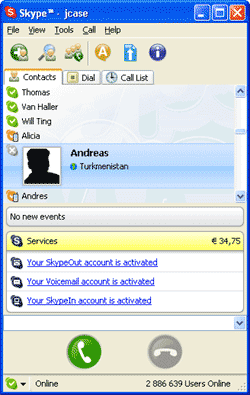 Skype is a proprietary peer-to-peer internet telephony (VoIP) network, founded by Niklas Zennström and Janus Friis, the creators of KaZaA. The Skype Group is headquartered in Luxembourg with offices also in London and Tallinn.
The system has a generally favorable reputation for working across different types of network connections (including firewalls and NAT) because voice packets are routed by the combined users of the free desktop software application.
The basic computer-to-computer service allows users to speak, to send instant messages or to send files to one another from their computers via the Internet at no cost. Conferences of up to five users are supported.
SkypeOut is a paid feature of the Skype internet telephony service, which allows Skype users to call virtually any non-computer-based landline or mobile telephone in the world.
SkypeIn allows Skype users to receive calls on their computers dialed by regular phone subscribers to regular phone numbers. Beta released on March 10, 2005, SkypeIn permits users to subscribe to numbers in UK, USA, France, Hong Kong, Denmark, Finland, Norway, Sweden, Estonia and Poland. Cost is €30 for a 12-month subscription, or €10 for a three-month subscription. Users can have multiple SkypeIn phone numbers bound to the same account (a separate subscription is required for each). For example, someone who does business in both San Francisco and Helsinki could create a local telephone number in each city, and callers from those locations would pay cheap or free local rates.
On September 12, 2005 eBay announced its plan to acquire the company for $US 2.6 billion, plus an additional 1.5 billion in rewards if goals are met by 2008. eBay will pay half in cash and half in stock options.
Skype is a proprietary peer-to-peer internet telephony (VoIP) network, founded by Niklas Zennström and Janus Friis, the creators of KaZaA. The Skype Group is headquartered in Luxembourg with offices also in London and Tallinn.
The system has a generally favorable reputation for working across different types of network connections (including firewalls and NAT) because voice packets are routed by the combined users of the free desktop software application.
The basic computer-to-computer service allows users to speak, to send instant messages or to send files to one another from their computers via the Internet at no cost. Conferences of up to five users are supported.
SkypeOut is a paid feature of the Skype internet telephony service, which allows Skype users to call virtually any non-computer-based landline or mobile telephone in the world.
SkypeIn allows Skype users to receive calls on their computers dialed by regular phone subscribers to regular phone numbers. Beta released on March 10, 2005, SkypeIn permits users to subscribe to numbers in UK, USA, France, Hong Kong, Denmark, Finland, Norway, Sweden, Estonia and Poland. Cost is €30 for a 12-month subscription, or €10 for a three-month subscription. Users can have multiple SkypeIn phone numbers bound to the same account (a separate subscription is required for each). For example, someone who does business in both San Francisco and Helsinki could create a local telephone number in each city, and callers from those locations would pay cheap or free local rates.
On September 12, 2005 eBay announced its plan to acquire the company for $US 2.6 billion, plus an additional 1.5 billion in rewards if goals are met by 2008. eBay will pay half in cash and half in stock options.
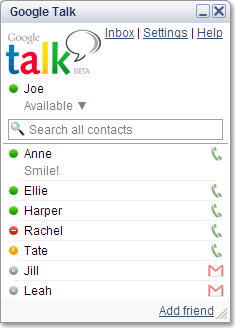 Google Talk is a service developed by Google for instant messaging (IM) that also allows for PC to PC audio conversations. Google Talk beta was released on August 24, 2005 and consists of both a service and a client used to connect to the service. Unlike some other instant messaging services, Google Talk uses an open protocol (Jabber) for the IM part and it encourages the use of clients other than their own in connecting to the Google Talk service.
As of the launch date, the Google Talk client is available only for Windows (2000, XP, Server 2003); users of other operating systems are provided with instructions for various popular Jabber clients, such as Psi or Miranda IM for Microsoft Windows and below, iChat or Adium for Mac OS X and Gaim for Linux. However, any program capable of using the Jabber protocol is sufficient, although the voice over IP service only works with the Google client. Google claims they will release a specification for the voice extension in the near future.
Google Talk is a service developed by Google for instant messaging (IM) that also allows for PC to PC audio conversations. Google Talk beta was released on August 24, 2005 and consists of both a service and a client used to connect to the service. Unlike some other instant messaging services, Google Talk uses an open protocol (Jabber) for the IM part and it encourages the use of clients other than their own in connecting to the Google Talk service.
As of the launch date, the Google Talk client is available only for Windows (2000, XP, Server 2003); users of other operating systems are provided with instructions for various popular Jabber clients, such as Psi or Miranda IM for Microsoft Windows and below, iChat or Adium for Mac OS X and Gaim for Linux. However, any program capable of using the Jabber protocol is sufficient, although the voice over IP service only works with the Google client. Google claims they will release a specification for the voice extension in the near future.
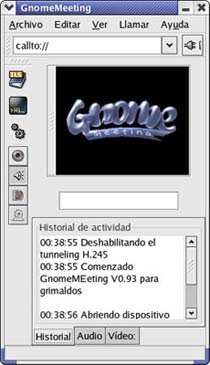 GnomeMeeting is an open source VoIP and video conferencing application for GNOME. It is based on the OpenH323 library and primarily uses the H.323 protocol, although support for SIP is in development. It supports many audio and video codecs, and is interoperable with Microsoft NetMeeting.
GnomeMeeting was written by Damien Sandras in order to graduate from the Université catholique de Louvain.
GnomeMeeting is an open source VoIP and video conferencing application for GNOME. It is based on the OpenH323 library and primarily uses the H.323 protocol, although support for SIP is in development. It supports many audio and video codecs, and is interoperable with Microsoft NetMeeting.
GnomeMeeting was written by Damien Sandras in order to graduate from the Université catholique de Louvain.
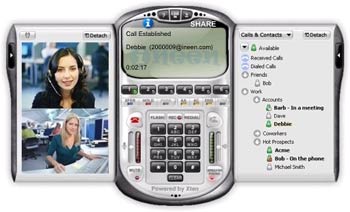 ineen is a VoIP network that allows free IP Telephony calls. ineen has a laundry list of features which include voice, video, conferencing, distributed conferencing, speakerphone, call transfer, and instant messaging. Unlike other software, ineen took the approach of an interface that models a normal phone.
The software is available for Windows, Mac OS X, and Pocket PC.
ineen is a VoIP network that allows free IP Telephony calls. ineen has a laundry list of features which include voice, video, conferencing, distributed conferencing, speakerphone, call transfer, and instant messaging. Unlike other software, ineen took the approach of an interface that models a normal phone.
The software is available for Windows, Mac OS X, and Pocket PC.
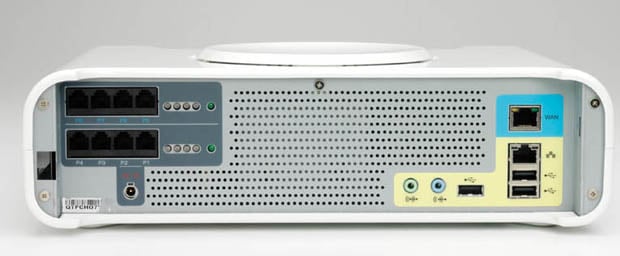 Today,
 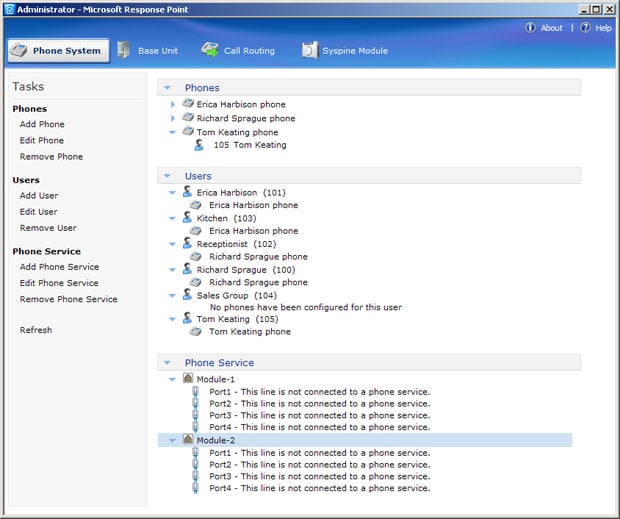 Lastly, check out my




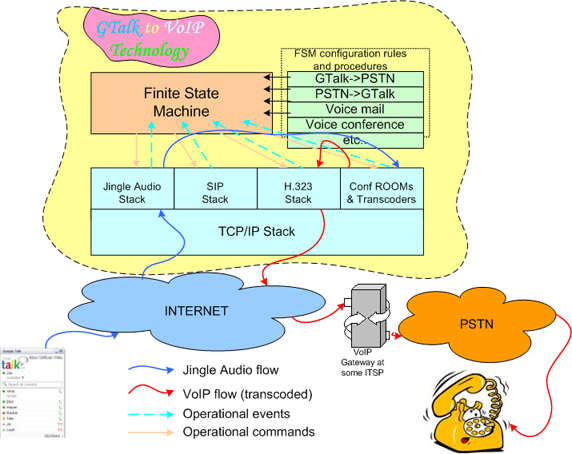 Signalling stacks can initiate and receive VoIP connetions from a TCP/IP network (which Internet is) and produce a number of operational events to upper level - to Finite State Machine. Signalling stacks can be connected to each others using conference rooms or transcoders, so media streams from one type of stack can go through another, thus implementing a VoIP gatewaying between different type of VoIP networks. Control over signalling stacks interconnections is driven by operational commands which are generated by FSM. Transcoders also do conversions of voice compression algorithms (media codecs) used in voip networks.


