History has forgotten Nathan Stubblefield, but thanks to the arrival of the 100th anniversary of his then-pioneering invention, the man's finally receiving his due.
In 1908 Stubblefield had the idea to use a complicated rig of wire and large poles set up around a train track, road, or river. When a train, vehicle, or boat traveled past the wires, a transmitting device on the vehicle would send an audio signal to a receiving device in the distance using magnetic waves.
A patent was granted for the device on May 9 of that year, which some are now crediting as the first wireless communications device ever. To wit, Virgin Mobile is honoring Stubblefield on the centennial of the patent with a set of web pages about the man. (Click through the photo gallery to get a better idea of how such a device worked. It's really pretty fascinating.)
Unfortunately, Stubblefield's invention wasn't entirely practical. The transmitter and receiver were enormous and far from portable (see picture), and they required so much wire that it would have been considerably more efficient to simply run the wire between the two transmitters instead of using wireless communications.
Still, it's nice to remember Stubblefield as a pioneer in a field that, at the time, few felt would have much of a future. History has of course shown of course that Stubblefield was on to something bigger than he knew: Harris Interactive's latest poll shows that 14 percent of adults use a cell phone exclusively at home now, sans land line.
 Post
Post
DIRECTLY TO
 |  |  |  |
YOUTHSPROUTS

Today and Tomorrow is Ours
Tuesday, May 13, 2008
100 th bithday to cell phone
Friday, April 18, 2008
WEB2.0 AND MORE FOR FREE ( GENERATE WEB 2.0 FREE)
anners
Graphicsguru has affordable pricing, Professional designs with same day delivery.
makes us a top choice when it comes to banner designing. Customer satisfaction
is top priority for us. It doesn't matter what size banners static or animated.
Standard Sizes
80x15 - 88x31 - 100x100 - 120x60 - 120x90 - 120x120 -120x600
234x30 - 125x125 - 160x600 - 300x250 - 468x60 - 728x90
|  |
| Logos
A leading graphic and web design company, We focus on providing cutting
edge logos to all categories of corporations and businesses. We are able to
provide brand recognition through skillfully designed logos for virtually any kind
of activity. Whether starting a new project or re-designing current logos, We will
help clients realize their identities through logos with unparalleled success.
Logo design for all types of businesses, High quality logos, Professional
custom company logo designs, Corporate logos, Business logos, Open Source.
|  |
| Web sites
Graphicsguru professional website Designs we are eagerly help businesses and
individual clients all over the World to establish or maintain a professional Internet
presence. We strives to create professional one of a kind web site designs. our
clients products and services to their target audience. Our eye-catching and
professional web site designs give the small business owner the power to compete
with big businesses! Custom Web Design Services for Corporate & Small Business
and integrate all developed components into any existing application If you are looking
for high-quality affordable web design then you have come to the right place. My
commitment to excellence ensures that your design will be eye pleasing, professional
and I will do so at cost-effective rates. Guaranteed.
|  |
| Graphics I can help you with any part of your graphics development needs. I offer logo designs, corporate identity, banner ads, illustration, print ads, brochures, product packaging, web design, web graphics, business cards, promotional marketing. and so much more! I am a highly motivated and experienced professional freelance web and graphics designer. I am extremely Fast without sacrificing quality or professionalism. |  |
MORE FREE BUTTON AND GIF GENERATORS ALL SPAM FREE. BE SURE TO CREATE ONE
WATCH YOUTUBE ON YOUR MOBILE (ANY MOBILE YOUTUBE) FREE
www.youthsprouts.blogspot.com
Photo
Bluetooth Remote Controls - Turn your mobile into a remote control

 __
__
WHAT IS GREASEMONKEY AND WHAT IS MEAN TO GMAIL AND OTHERS?
www.youthsprouts.blogspot.com Enhance your web experience with Greasemonkey You may come across Greasemonkey scripts which does something useful but are clueless what the heck is Greasemonkey. If you already know about Greasemonkey, well go ahead and check out some other post on my blog, but if you don't know read on. Greasemonkey is a FireFox extension which once installed in FireFox lets you install scripts that make changes to Web Pages. Many times you wish for some feature while browsing your favorite site which isn't there. Like a download link to download videos when you browse YouTube. Install a Greasemonkey script and you'll have that feature. There are thousands of scripts available for various websites and if you know a bit of coding, you can build your own script. The summary is, Greasemonkey provides you with additional functionality for any web page by making on the fly changes to it. And as the scripts are persistent, the changes made to the web page are permanent. So what's you are waiting for. Go ahead and install this awesome extension and add that little feature to your favorite web page you were always wishing for. Download Greasemonkey Find thousands of Greasemonkey scripts Build your own Greasemonkey script. Tutorial and guide
How to create Firefox extension from Greasemonkey scripts
 Here's an online tool which converts a Greasemonkey script into a FireFox extension (XPI). Its very easy to use, just enter details like GUID, creator name, extension version etc and copy paste the content of the user script and hit the 'Compile' button. The XPI file would be available for download immediately. Once you install the extension into Firefox, you can take advantage of the script even without Greasemonkey.
__
Here's an online tool which converts a Greasemonkey script into a FireFox extension (XPI). Its very easy to use, just enter details like GUID, creator name, extension version etc and copy paste the content of the user script and hit the 'Compile' button. The XPI file would be available for download immediately. Once you install the extension into Firefox, you can take advantage of the script even without Greasemonkey.
__
Sony Ericsson XPERIA X1 , Looks impressive
www.youthsprouts.blogspot.com

 Its display size is 800 x 480 pixels, 3 inches. with 65K colors and TFT touchscreen. Has an internal memory of 400 MB and runs on Microsoft Windows Mobile 6.0 Professional. It looks very impressive with its distinctive Arc slider design. Other features include Truly mobile internet, RSS feeds, Multiple navigation, Handwriting Recognition, Wi-Fi support etc.
Full specifications here
X1 Overview
Watch the XPERIA X1 hands on MWC 2008 Barcelona Video
Its display size is 800 x 480 pixels, 3 inches. with 65K colors and TFT touchscreen. Has an internal memory of 400 MB and runs on Microsoft Windows Mobile 6.0 Professional. It looks very impressive with its distinctive Arc slider design. Other features include Truly mobile internet, RSS feeds, Multiple navigation, Handwriting Recognition, Wi-Fi support etc.
Full specifications here
X1 Overview
Watch the XPERIA X1 hands on MWC 2008 Barcelona Video
- 110.0 x 17.0 x 53.0 mm
- 4.3 x 0.7 x 2.1 inches
- 145.0 gr
- 5.1 oz

- 800 X 480
- 65,536 color TFT
- Up to 400 MB Phone Memory
- MicroSD support
- GSM 850
- GSM 900
- GSM 1800
- GSM 1900
- EDGE
- HSDPA
- HSUPA
- UMTS 850
- UMTS 900
- UMTS 1700
- UMTS 1900
- UMTS 2100
Free RSS/Feed Icons
If you are bored of the same conventional RSS/Feed icons, there are many different styles of buttons available which you can use for free in you site/blog. browse through the sites listed below and find the one button for you!
Free Glass Style RSS/Feed Icons
 Web 2.0 style feed buttons
 Feedicons from zeusboxstudio
 Rss Icons Orb
 Standard Feed icons
 30 Free Vector RSS Icons
 Buttons for RSS, Feeds, and XML in various styles.


FREE FREE FREE
__
Thursday, April 17, 2008
Mobile location information
www.youthsprouts.blogspot.com
Mobile location information
mcc = Mobile Country Code
mnc = Mobile Network Code
lac = Location Area Code
cellid = Cell Id
mcc and mnc is the same wherever you are.
Normally, you would collect some data of your location
and match it with lac/cellid. Then later you can guess
your location from current lac/cellid.
CODE :
import location
mcc, mnc, lac, cellid = location.gsm_location()
# lac, cellid can be used to guess your location
SEND SMS FROM NOKIA Series 60
import messaging
messaging.sms_send(number, text)
Sending file via bluetooth
Python for series 60 enables many fun bluetooth stuff.
from socket import *
a = '00:10:60:ab:25:6f'
bt_obex_discover(a) # found at port 3
f = u'C:\\Nokia\\Startermonlog.txt'
bt_obex_send_file(a, 3, f)
__
PyS60: Bluetooth GPS polling class
www.youthsprouts.blogspot.com
Threaded approach for reading NMEA data from a bluetooth GPS
import thread, socket
class BTGPSPoller(object):
def __init__(self, address):
address, services = socket.bt_discover(address)
self.target = (address, services.values()[0])
self.active = True
self.connected = False
self.lock = thread.allocate_lock()
self.sentances = list()
def connect(self):
if not self.connected:
thread.start_new_thread(self.run, ())
def run(self):
print "BTGPSPoller thread activated"
try:
conn = socket.socket(socket.AF_BT, socket.SOCK_STREAM)
conn.connect(self.target)
self.connected = True
except:
print "Unable to connect"
if self.connected:
try:
to_gps = conn.makefile("r", 0)
except:
print "Failure calling conn.makefile()"
while self.active:
#e32.ao_sleep(1)
msg = None
try:
msg = to_gps.readline()
if not msg == None and msg.startswith("$GPGGA"):
gps_data = msg.split(",")
if not gps_data[2] == "":
self.lock.acquire()
self.sentances.append(msg)
if len(self.sentances) > 10:
self.sentances.pop(0)
self.lock.release()
except:
self.active = False
try:
to_gps.close()
conn.close()
self.connected = False
print "Closed and disconnected"
except:
self.connected = False
print "Unable to close"
def disconnect(self):
self.active = False
print "Disconnecting from GPS"
def getSentances(self):
self.lock.acquire()
l = self.sentances[:]
self.lock.release()
return l
__
Monday, April 14, 2008
Detect the presence of a Bluetooth device
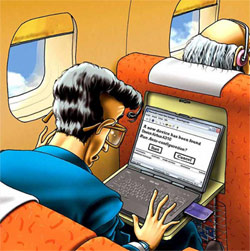 This is the second in our series of articles showing how to deploy a Bluetooth Proximity Detection system with Asterisk@Home. Part I is here. When we’re finished, your system will automatically transfer incoming calls in your home or office to your cellphone or any other phone whenever you leave home base carrying your bluetooth-enabled cellphone or your bluetooth headset. You’ll recall that we recommended the headset approach because cellphones have a nasty habit of putting themselves and their bluetooth adapter to sleep when you’re not on the phone. If bluetooth on the phone is sleeping, we lose our ability to detect your comings and goings so be reasonable and do it our way. Use a bluetooth headset. Once you remove the earpiece, the bluetooth headset fits comfortably in your pocket and isn’t much larger than a flash drive. For our purposes the bluetooth headset will be functioning primarily as an electronic key although there’s no reason you can’t also use it in conjunction with either your bluetooth cellphone, or a softphone connected to your primary Asterisk@Home PBX, or all of the above. The major difference in our approach and some of the other proximity detection systems which (still) are on the drawing boards is cost. Our bluetooth headset “key” costs roughly $30 delivered to your door. Most of the corporate dream systems require a $200 badge (to do the same thing) and then an incredibly expensive server (to do what we’re doing with an old clunker PC). So, yes, open source technology is a very good thing for all of us. And it deserves your financial support. Here’s a link if you’d like to make a contribution in any amount to the Asterisk@Home project. End of sermon.
NOTE: This article has been updated to take advantage of TrixBox, freePBX, and the iPhone. For the current article, click here.
Detect the presence of a Bluetooth device
This example shows how to check for the presence of a mobile phone. The code was based on the article 'Implementing Bluetooth Proximity Detection with Asterisk.#!/usr/bin/ruby #file: whereib.rb deviceid = '00:0E:6D:29:38:EB' devicename = 'Nokia 6600' count = 0 while count < 1 if `hcitool name #{deviceid}`.chomp == devicename puts devicename + ' IN RANGE' puts Time.now else puts devicename + ' OUT OF RANGE' puts Time.now end sleep 7 end__
www.youthsprouts.blogspot.com
As you may know, we launched Zoho applications for iPhone earlier at izoho.com. Today, we are extending our mobile support further. Coming just a week after an important update, Zoho Writer’s new functionality includes support for Windows Mobile.
You can now access your Zoho Writer documents from your Windows Mobile device. Currently we support Windows Mobile 6.0. Documents in Zoho Writer can be viewed using Internet Explorer on your Windows Mobile device. The current version supports viewing your documents. Document editing will be offered later.


This video gives you a quick idea on how Zoho Writer works offline on your windows mobile device.
One of the significant functionality added in this update is offline support on your Windows Mobile device. As you may know, desktop version of Zoho Writer supports offline capability using Google Gears. With today’s launch of Google Gears for Windows Mobile, we are extending our offline support to Windows Mobile devices as well. This means you can now access your Zoho Writer documents from your Windows Mobile device on the plane. __Plantronics Voyager 510 USB Bluetooth headset--- for skype
www.youthsprouts.blogspot.com
Photo
Plantronics sent me their Click for Amazon price:
Plantronics Voyager 510 Bluetooth Headset with Multipoint Technology [Retail Packaged]
Buy Now', STICKY, TIMEOUT, 6000);" onmouseout="return nd();">Voyager 510 Bluetooth headset to review. Unlike any other Bluetooth headsets, the Plantronics Voyager 510 USB Bluetooth headset is the first to simultaneously support both VoIP softphones on your PC and your Bluetooth mobile phone simultaneously -- negating the need to deregister/re-register your Bluetooth connection with the other device. Plantronics is able to do this using their exclusive Multipoint Technology.
Measuring 4.0 x 2.5 x 0.8 inches and weighing 5.6 ounces, the Plantronic Voyager 510 headset is pretty lightweight - after awhile you don't even notice it is there. It is slightly heavier and bulkier than the Click for Amazon price:
Motorola HS850 Bluetooth Headset [Bulk Packaged]
Buy Now', STICKY, TIMEOUT, 6000);" onmouseout="return nd();">Motorola HS850 , but I found the Voyager 510-USB much more comfortable on my ear. The Motorola HS850 would often dangle and not stay put.
Many PCs or even laptops don't have built-in Bluetooth, but fortunately, the Voyager 510 USB includes a plug and play Bluetooth USB adapter that works without the need for any software drivers. This enables mobile professionals to engage in one-step hands-free VoIP calling. If you want the ability to perform remote-end answer/hang-up integration with softphones you'll need to install the PerSonoCall application.
 The system integrates with enterprise softphone software from leading companies — including Avaya, Cisco, Nortel, Skype, and others — to offer call notification and remote call answering through the headset. It also is compatible with most popular consumer VoIP services, like AOL, MSN, and Yahoo! although it doesn't feature remote call answer with these yet. I tested the ability to remotely answer incoming Skype calls from the 510-USB and it worked without a hitch. On an incoming Skype call from Greg Galitzine I simply pressed the call control button on the 510-USB and the Skype call was accepted. Beauty, eh?
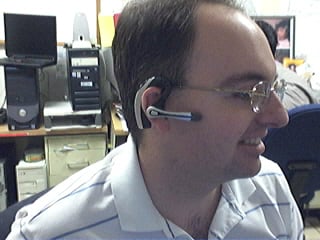 Profile of the Plantronics Voyager 510 USB Bluetooth Headset
The headset's "smart" technology knows which Bluetooth device you are using and allows you to take calls from any device simply by hitting the button. With the optional Plantronics Bluetooth Deskphone Adapter you can even switch between your office phone and your Bluetooth mobile phone. Thus, you won't need to use a dedicated "landline" phone headset.
The 510 headset features a noise-canceling microphone for clearer conversations and the mic boom swivels to position on either ear. The 510 supports adaptive frequency hopping (AFH) which helps avoid interference from WiFi networks. It supports a hefty 6 hours talk time using the built-in Lithium polymer rechargeable battery and up to 100 hours of standby time.
Profile of the Plantronics Voyager 510 USB Bluetooth Headset
The headset's "smart" technology knows which Bluetooth device you are using and allows you to take calls from any device simply by hitting the button. With the optional Plantronics Bluetooth Deskphone Adapter you can even switch between your office phone and your Bluetooth mobile phone. Thus, you won't need to use a dedicated "landline" phone headset.
The 510 headset features a noise-canceling microphone for clearer conversations and the mic boom swivels to position on either ear. The 510 supports adaptive frequency hopping (AFH) which helps avoid interference from WiFi networks. It supports a hefty 6 hours talk time using the built-in Lithium polymer rechargeable battery and up to 100 hours of standby time.
 Front View of the Voyager 510 USB Bluetooth Headset
When you place the headset on the charging base, it automatically turns off the headset and charges it. Fortunately, when you remove the Voyager 510 from the charging base it remembers to turn it back on. Similarly, if you manually shut off the headset (depress power switch for 3s) and then place it on the charger, if you remove the headset from the base, the headset stays off. I wonder if the headset isn't truly "off" when you place the Voyager headset onto the charging base while it is still on? It's probably in a pseudo-sleep mode, but not totally powered off. The difference in charging the battery is probably negligible, so most users will probably keep the headset always turned on even when charging.
Front View of the Voyager 510 USB Bluetooth Headset
When you place the headset on the charging base, it automatically turns off the headset and charges it. Fortunately, when you remove the Voyager 510 from the charging base it remembers to turn it back on. Similarly, if you manually shut off the headset (depress power switch for 3s) and then place it on the charger, if you remove the headset from the base, the headset stays off. I wonder if the headset isn't truly "off" when you place the Voyager headset onto the charging base while it is still on? It's probably in a pseudo-sleep mode, but not totally powered off. The difference in charging the battery is probably negligible, so most users will probably keep the headset always turned on even when charging.
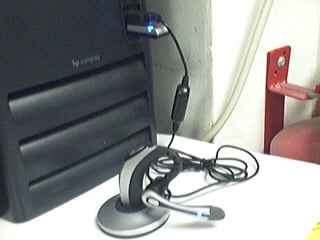 Plantronics USB 510 charging base connected to 1 USB port.
Bluetooth dongle connected to PC's 2nd USB port
Button functionality & testing
I had some minor difficulties with the power on/off switch which is very small and located just in front of the volume buttons, and it requires a very hard press. When the headset is on your ear, making a hard button press took a little getting used to. In any case, there are basically three buttons on the headset. The first button is simply a +/- volume button, which happens to be the largest of the three making it easy to adjust the volume.
The 2nd button on the 510 is the small black button I mentioned which toggles the power button (and mute with a quick depress). The power button requires you hold the button for 3s to toggle the power. Well, they advertise in the manual that it's 3 seconds, but I tested it and it's actually 3s to turn on and just 2-2.5s to turn off. The 3s is a tad long to turn on, but useful I suppose to prevent accidentally turning on or off the headset. Of course, like I said, you have to press the power button pretty hard, so I doubt it would be pressed by accident. It probably has more to do with the time it takes to negotiate a connection with the other Bluetooth devices.
The 3rd button on the Voyager is placed where the boom mic meats the ear piece and it is used to call answer or end the call, as well as toggle between your PC Bluetooth connection and your Bluetooth mobile phone. It is also used to activate voice dialing, redial, and other functions.
To activate last number redial you simply double click the call control button. You will hear a high tone for each key press. When you hear a further tone, the last number has been redialed. In addition, when receiving an incoming call you can press and hold the call control button to reject a call. You will hear a tone. When you hear a second tone, the call has been rejected and you can release the button.
Voice Dialing & Call Transfer to other BT device
You can easily perform voice dialing supported by your mobile phone by pressing and holding the call control button for 2 seconds until you hear a second tone. Then you can speak the name of the person you wish to reach. Switching a call from your mobile phone to the headset is pretty straightforward. You simply briefly press the call control button. Switching a call from the headset back to the phone requires a slighly longer button press until you hear a tone indicating the transfer has been complete. I was able to listen to streaming music on the 510-USB, hear beeps in the headset that an incoming call was coming in, and then press the call control to answer the call.
Features
Plantronics USB 510 charging base connected to 1 USB port.
Bluetooth dongle connected to PC's 2nd USB port
Button functionality & testing
I had some minor difficulties with the power on/off switch which is very small and located just in front of the volume buttons, and it requires a very hard press. When the headset is on your ear, making a hard button press took a little getting used to. In any case, there are basically three buttons on the headset. The first button is simply a +/- volume button, which happens to be the largest of the three making it easy to adjust the volume.
The 2nd button on the 510 is the small black button I mentioned which toggles the power button (and mute with a quick depress). The power button requires you hold the button for 3s to toggle the power. Well, they advertise in the manual that it's 3 seconds, but I tested it and it's actually 3s to turn on and just 2-2.5s to turn off. The 3s is a tad long to turn on, but useful I suppose to prevent accidentally turning on or off the headset. Of course, like I said, you have to press the power button pretty hard, so I doubt it would be pressed by accident. It probably has more to do with the time it takes to negotiate a connection with the other Bluetooth devices.
The 3rd button on the Voyager is placed where the boom mic meats the ear piece and it is used to call answer or end the call, as well as toggle between your PC Bluetooth connection and your Bluetooth mobile phone. It is also used to activate voice dialing, redial, and other functions.
To activate last number redial you simply double click the call control button. You will hear a high tone for each key press. When you hear a further tone, the last number has been redialed. In addition, when receiving an incoming call you can press and hold the call control button to reject a call. You will hear a tone. When you hear a second tone, the call has been rejected and you can release the button.
Voice Dialing & Call Transfer to other BT device
You can easily perform voice dialing supported by your mobile phone by pressing and holding the call control button for 2 seconds until you hear a second tone. Then you can speak the name of the person you wish to reach. Switching a call from your mobile phone to the headset is pretty straightforward. You simply briefly press the call control button. Switching a call from the headset back to the phone requires a slighly longer button press until you hear a tone indicating the transfer has been complete. I was able to listen to streaming music on the 510-USB, hear beeps in the headset that an incoming call was coming in, and then press the call control to answer the call.
Features
- Multipoint Technology allows you to seamlessly switch between two Bluetooth devices
- Noise-canceling microphone for superior sound quality
- Up to 6 hours talk time and up to 100 hours standby time
- One-touch call answer/end, last number redial and voice activated dialing
- Compatible with Bluetooth devices supporting the headset or hands-free profile
- Noise-canceling microphone and wind-reduction technology for brilliant sound both indoors and out;
- Lightweight, foldable design for all-day comfort and easy storage;
- Boom swivels for use on either ear;
- 33-foot roaming distance. feet away from voice-enabled Bluetooth devices
Plantronics Voyager 510 Bluetooth Headset with Multipoint Technology [Retail Packaged]
Buy Now', STICKY, TIMEOUT, 6000);" onmouseout="return nd();">Voyager 510 USB Bluetooth headset is available on Amazon for just $47.99 if you just need the headset to have access to a Bluetooth mobile phone. If you need the optional USB Bluetooth dongle/transmitter for PC-connectivity (VoIP, iTunes, other sound apps) then you can also Click for Amazon price:
Plantronics Voyager 510S Bluetooth Headset System
Buy Now', STICKY, TIMEOUT, 6000);" onmouseout="return nd();">pick it up on Amazon for about $179 (originally $299). Some PC's come with Bluetooth adaptors, or you may already have a USB Bluetooth dongle - though I'm not sure how well Plantronic's multipoint technology works if you use a 3rd party Bluetooth dongle. Best bet is to pay the $179 for both the headset and the Plantronics USB Bluetooth adaptor. __
Saturday, April 12, 2008
Nokia Predicts 500 Million Mobile Users by 2010
  |
|
Speaking at the Goafest Conclave, D Shivakumar, vice president and managing director of Nokia India, predicted that half the subscribers will be accessing the Internet through mobile phones. In his view, services delivered through mobiles will open a window of opportunity for advertisers in the country. He went on to say that the market will be divided into three sections: the top-end limited to some 50 million customers, the mid-range comprising around 150 million subscribers, and the third tier -- claimed to be unique to India -- dominated by low-cost basic handsets with minimal functionality.
While it may be good for India to have so many mobile phone users by 2010, it may be quite another thing for them to experience better network connectivity and cheaper calling rates by that time.
ANDROID AND MORE ---GOOGLE.....Android - An Open Handset Alliance Project
www.youthsprouts.blogspot.com
The Open Handset Alliance, a group of more than 30 technology and mobile companies, is developing Android: the first complete, open, and free mobile platform. To help developers get started developing new applications, we're offering an early look at the Android Software Development Kit. Open
Android allows you to access core mobile device functionality through standard API calls. All applications are equal
Android does not differentiate between the phone's basic and third-party applications -- even the dialer or home screen can be replaced.
Breaking down boundaries
Combine information from the web with data on the phone -- such as contacts or geographic location -- to create new user experiences. Fast & easy development
The SDK contains what you need to build and run Android applications, including a true device emulator and advanced debugging tools.
Sergey Brin and Steve Horowitz discuss the availability of the SDK, that it will be open source in the future, and demo some applications.
Three part overview of the Android architecture and APIs
First look at building an Android Application
more videos
__
Google Developer Day US - Fast, Easy, Beautiful: GWT
www.youthsprouts.blogspot.com
Google Web Toolkit (GWT) makes it easier to write high-performance AJAX applications. You write your front end in the Java programming language and GWT compiles your source into highly optimized JavaScript. Writing web apps today is a tedious and error-prone process. You spend 90% of your time working around browser quirks, and JavaScript's lack of modularity makes sharing, testing, and reusing AJAX components difficult and fragile. It doesn't have to be that way.
High performance JavaScript. GWT produces AJAX apps that:
Load faster than hand-written JavaScript apps
Use smaller, more compact, cacheable code
Automatically support IE, Firefox, Mozilla, Safari, and Opera
Use the browser's "back" button correctly
Better development tools. Since you're writing in Java, you can use:
IDEs that you love like Eclipse, IntelliJ, and NetBeans
Full-featured debugging, with variable watches and breakpoints
Unit tests (based on JUnit) both in a debugger and in a browser
Google APIs and reusable UI components. GWT comes equipped with useful libraries:
Built-in UI components serve as cross-browser building blocks for your app
RPC helps with client-server interaction
JavaScript Native Interface (JSNI) simplifies integrating GWT code with existing JavaScript code
__
Friday, April 11, 2008
Samsung SPH-P9000 WiMax Phone Unveiled--- a cool phone
 Samsung today unveiled the SPH-P9000 Deluxe MITs, the latest in mobile convergence device. Introduced at the Mobile WiMax Summit 2006, the SPH-P9000 ushers in the new era of mobile convergence technology, capable of voice and multimedia data communications through Mobile WiMax technology.
The SPH-P9000 is a PDA-based device utilizing Mobile WiMax and CDMA EV-DO connectivity for wireless access to the Internet and simultaneously providing mobile phone connection for voice communication.
With Microsoft Windows XP as the operating system, users will find the contents and applications familiar and easy to use for work and play. Integrating a QWERTY keyboard, the SPH-P9000 offers painless typing and internet surfing, while the MP3 player function, VOD, and camera function provide a quick access to multimedia entertainment.
The 5.0-inch WVGA screen is prepared for movie and document viewing, while the 30 GB hard drive stores music, movies, and documents. All of these unique features are combined into one device that weighs in at a little over one pound. The SPH-P9000 will be launched in Korea first half of 2007.
Samsung SPH-P9000 Specifications
- Standard: Mobile WiMax / CDMA 1x EV-DO
- Camera: 1.3-Megapixel Camera
- Display: 5-inch WVGA LCD
- 1 GHz (Transmeta) CPU
- QWERTY Keyboard
- Bluetooth (Class 1) with BT Messenger
- MiniUSB / 24 pin Connector
- Extended I/O Pack
- 2980 mAh / 7200 mAh Battery
- 30 GB Embedded
- Size: 143 x 92 x 29.7 mm
- Weight: 560 g
__
Samsung today unveiled the SPH-P9000 Deluxe MITs, the latest in mobile convergence device. Introduced at the Mobile WiMax Summit 2006, the SPH-P9000 ushers in the new era of mobile convergence technology, capable of voice and multimedia data communications through Mobile WiMax technology.
The SPH-P9000 is a PDA-based device utilizing Mobile WiMax and CDMA EV-DO connectivity for wireless access to the Internet and simultaneously providing mobile phone connection for voice communication.
With Microsoft Windows XP as the operating system, users will find the contents and applications familiar and easy to use for work and play. Integrating a QWERTY keyboard, the SPH-P9000 offers painless typing and internet surfing, while the MP3 player function, VOD, and camera function provide a quick access to multimedia entertainment.
The 5.0-inch WVGA screen is prepared for movie and document viewing, while the 30 GB hard drive stores music, movies, and documents. All of these unique features are combined into one device that weighs in at a little over one pound. The SPH-P9000 will be launched in Korea first half of 2007.
Samsung SPH-P9000 Specifications
- Standard: Mobile WiMax / CDMA 1x EV-DO
- Camera: 1.3-Megapixel Camera
- Display: 5-inch WVGA LCD
- 1 GHz (Transmeta) CPU
- QWERTY Keyboard
- Bluetooth (Class 1) with BT Messenger
- MiniUSB / 24 pin Connector
- Extended I/O Pack
- 2980 mAh / 7200 mAh Battery
- 30 GB Embedded
- Size: 143 x 92 x 29.7 mm
- Weight: 560 g
__
WiMAX-enabled VoIP phone showcased at Mobile World Congress
www.youthsprouts.blogspot.com


 Ridiculous quantities of 3G handsets weren't the only things showed off at this year's Mobile World Congress -- oh no, NetIndex, Kaga Electronics and Runcom shook up the norm a bit with their WiMAX-enabled portable VoIP phone. Reportedly, the trio joined forces to develop a VoIP handset that utilized a 802.16e module, and aside from "realizing all-IP voice communication," it also sports a web browser and integrated WiFi for times when a plain ole hotspot will do. Sadly, we've no idea where this thing will go after it leaves Barcelona (nor what it looks like), but here's to hoping it makes a commercial debut -- and can decide on a single logo -- in the not-too-distant future.
__
Ridiculous quantities of 3G handsets weren't the only things showed off at this year's Mobile World Congress -- oh no, NetIndex, Kaga Electronics and Runcom shook up the norm a bit with their WiMAX-enabled portable VoIP phone. Reportedly, the trio joined forces to develop a VoIP handset that utilized a 802.16e module, and aside from "realizing all-IP voice communication," it also sports a web browser and integrated WiFi for times when a plain ole hotspot will do. Sadly, we've no idea where this thing will go after it leaves Barcelona (nor what it looks like), but here's to hoping it makes a commercial debut -- and can decide on a single logo -- in the not-too-distant future.
__
Earn $$ with WidgetBucks


