www.youthsprouts.blogspot.com
Photo
 Plantronics sent me their Click for Amazon price:
Plantronics Voyager 510 Bluetooth Headset with Multipoint Technology [Retail Packaged]
Buy Now', STICKY, TIMEOUT, 6000);" onmouseout="return nd();">Voyager 510 Bluetooth headset to review. Unlike any other Bluetooth headsets, the Plantronics Voyager 510 USB Bluetooth headset is the first to simultaneously support both VoIP softphones on your PC and your Bluetooth mobile phone simultaneously -- negating the need to deregister/re-register your Bluetooth connection with the other device. Plantronics is able to do this using their exclusive Multipoint Technology.
Measuring 4.0 x 2.5 x 0.8 inches and weighing 5.6 ounces, the Plantronic Voyager 510 headset is pretty lightweight - after awhile you don't even notice it is there. It is slightly heavier and bulkier than the Click for Amazon price:
Motorola HS850 Bluetooth Headset [Bulk Packaged]
Buy Now', STICKY, TIMEOUT, 6000);" onmouseout="return nd();">Motorola HS850 , but I found the Voyager 510-USB much more comfortable on my ear. The Motorola HS850 would often dangle and not stay put.
Many PCs or even laptops don't have built-in Bluetooth, but fortunately, the Voyager 510 USB includes a plug and play Bluetooth USB adapter that works without the need for any software drivers. This enables mobile professionals to engage in one-step hands-free VoIP calling. If you want the ability to perform remote-end answer/hang-up integration with softphones you'll need to install the PerSonoCall application.
 The system integrates with enterprise softphone software from leading companies — including Avaya, Cisco, Nortel, Skype, and others — to offer call notification and remote call answering through the headset. It also is compatible with most popular consumer VoIP services, like AOL, MSN, and Yahoo! although it doesn't feature remote call answer with these yet. I tested the ability to remotely answer incoming Skype calls from the 510-USB and it worked without a hitch. On an incoming Skype call from Greg Galitzine I simply pressed the call control button on the 510-USB and the Skype call was accepted. Beauty, eh?
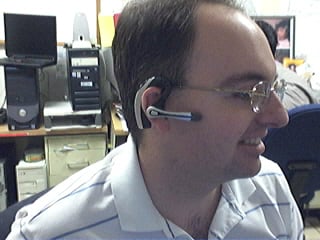 Profile of the Plantronics Voyager 510 USB Bluetooth Headset
The headset's "smart" technology knows which Bluetooth device you are using and allows you to take calls from any device simply by hitting the button. With the optional Plantronics Bluetooth Deskphone Adapter you can even switch between your office phone and your Bluetooth mobile phone. Thus, you won't need to use a dedicated "landline" phone headset.
The 510 headset features a noise-canceling microphone for clearer conversations and the mic boom swivels to position on either ear. The 510 supports adaptive frequency hopping (AFH) which helps avoid interference from WiFi networks. It supports a hefty 6 hours talk time using the built-in Lithium polymer rechargeable battery and up to 100 hours of standby time.
Profile of the Plantronics Voyager 510 USB Bluetooth Headset
The headset's "smart" technology knows which Bluetooth device you are using and allows you to take calls from any device simply by hitting the button. With the optional Plantronics Bluetooth Deskphone Adapter you can even switch between your office phone and your Bluetooth mobile phone. Thus, you won't need to use a dedicated "landline" phone headset.
The 510 headset features a noise-canceling microphone for clearer conversations and the mic boom swivels to position on either ear. The 510 supports adaptive frequency hopping (AFH) which helps avoid interference from WiFi networks. It supports a hefty 6 hours talk time using the built-in Lithium polymer rechargeable battery and up to 100 hours of standby time.
 Front View of the Voyager 510 USB Bluetooth Headset
When you place the headset on the charging base, it automatically turns off the headset and charges it. Fortunately, when you remove the Voyager 510 from the charging base it remembers to turn it back on. Similarly, if you manually shut off the headset (depress power switch for 3s) and then place it on the charger, if you remove the headset from the base, the headset stays off. I wonder if the headset isn't truly "off" when you place the Voyager headset onto the charging base while it is still on? It's probably in a pseudo-sleep mode, but not totally powered off. The difference in charging the battery is probably negligible, so most users will probably keep the headset always turned on even when charging.
Front View of the Voyager 510 USB Bluetooth Headset
When you place the headset on the charging base, it automatically turns off the headset and charges it. Fortunately, when you remove the Voyager 510 from the charging base it remembers to turn it back on. Similarly, if you manually shut off the headset (depress power switch for 3s) and then place it on the charger, if you remove the headset from the base, the headset stays off. I wonder if the headset isn't truly "off" when you place the Voyager headset onto the charging base while it is still on? It's probably in a pseudo-sleep mode, but not totally powered off. The difference in charging the battery is probably negligible, so most users will probably keep the headset always turned on even when charging.
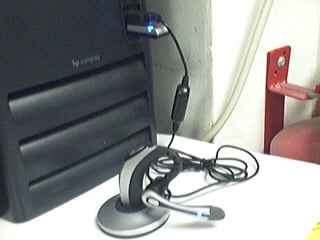 Plantronics USB 510 charging base connected to 1 USB port.
Bluetooth dongle connected to PC's 2nd USB port
Button functionality & testing
I had some minor difficulties with the power on/off switch which is very small and located just in front of the volume buttons, and it requires a very hard press. When the headset is on your ear, making a hard button press took a little getting used to. In any case, there are basically three buttons on the headset. The first button is simply a +/- volume button, which happens to be the largest of the three making it easy to adjust the volume.
The 2nd button on the 510 is the small black button I mentioned which toggles the power button (and mute with a quick depress). The power button requires you hold the button for 3s to toggle the power. Well, they advertise in the manual that it's 3 seconds, but I tested it and it's actually 3s to turn on and just 2-2.5s to turn off. The 3s is a tad long to turn on, but useful I suppose to prevent accidentally turning on or off the headset. Of course, like I said, you have to press the power button pretty hard, so I doubt it would be pressed by accident. It probably has more to do with the time it takes to negotiate a connection with the other Bluetooth devices.
The 3rd button on the Voyager is placed where the boom mic meats the ear piece and it is used to call answer or end the call, as well as toggle between your PC Bluetooth connection and your Bluetooth mobile phone. It is also used to activate voice dialing, redial, and other functions.
To activate last number redial you simply double click the call control button. You will hear a high tone for each key press. When you hear a further tone, the last number has been redialed. In addition, when receiving an incoming call you can press and hold the call control button to reject a call. You will hear a tone. When you hear a second tone, the call has been rejected and you can release the button.
Voice Dialing & Call Transfer to other BT device
You can easily perform voice dialing supported by your mobile phone by pressing and holding the call control button for 2 seconds until you hear a second tone. Then you can speak the name of the person you wish to reach. Switching a call from your mobile phone to the headset is pretty straightforward. You simply briefly press the call control button. Switching a call from the headset back to the phone requires a slighly longer button press until you hear a tone indicating the transfer has been complete. I was able to listen to streaming music on the 510-USB, hear beeps in the headset that an incoming call was coming in, and then press the call control to answer the call.
Features
Plantronics USB 510 charging base connected to 1 USB port.
Bluetooth dongle connected to PC's 2nd USB port
Button functionality & testing
I had some minor difficulties with the power on/off switch which is very small and located just in front of the volume buttons, and it requires a very hard press. When the headset is on your ear, making a hard button press took a little getting used to. In any case, there are basically three buttons on the headset. The first button is simply a +/- volume button, which happens to be the largest of the three making it easy to adjust the volume.
The 2nd button on the 510 is the small black button I mentioned which toggles the power button (and mute with a quick depress). The power button requires you hold the button for 3s to toggle the power. Well, they advertise in the manual that it's 3 seconds, but I tested it and it's actually 3s to turn on and just 2-2.5s to turn off. The 3s is a tad long to turn on, but useful I suppose to prevent accidentally turning on or off the headset. Of course, like I said, you have to press the power button pretty hard, so I doubt it would be pressed by accident. It probably has more to do with the time it takes to negotiate a connection with the other Bluetooth devices.
The 3rd button on the Voyager is placed where the boom mic meats the ear piece and it is used to call answer or end the call, as well as toggle between your PC Bluetooth connection and your Bluetooth mobile phone. It is also used to activate voice dialing, redial, and other functions.
To activate last number redial you simply double click the call control button. You will hear a high tone for each key press. When you hear a further tone, the last number has been redialed. In addition, when receiving an incoming call you can press and hold the call control button to reject a call. You will hear a tone. When you hear a second tone, the call has been rejected and you can release the button.
Voice Dialing & Call Transfer to other BT device
You can easily perform voice dialing supported by your mobile phone by pressing and holding the call control button for 2 seconds until you hear a second tone. Then you can speak the name of the person you wish to reach. Switching a call from your mobile phone to the headset is pretty straightforward. You simply briefly press the call control button. Switching a call from the headset back to the phone requires a slighly longer button press until you hear a tone indicating the transfer has been complete. I was able to listen to streaming music on the 510-USB, hear beeps in the headset that an incoming call was coming in, and then press the call control to answer the call.
Features
- Multipoint Technology allows you to seamlessly switch between two Bluetooth devices
- Noise-canceling microphone for superior sound quality
- Up to 6 hours talk time and up to 100 hours standby time
- One-touch call answer/end, last number redial and voice activated dialing
- Compatible with Bluetooth devices supporting the headset or hands-free profile
- Noise-canceling microphone and wind-reduction technology for brilliant sound both indoors and out;
- Lightweight, foldable design for all-day comfort and easy storage;
- Boom swivels for use on either ear;
- 33-foot roaming distance. feet away from voice-enabled Bluetooth devices
Pros
- Lightweight
- Flexible and foldable to stow in pocket
- Cool charging base
- Excellent Sound Quality
- Comes with 3 different sized ear pieces for the best fit
- Includes a small portable USB Bluetooth "dongle" to Bluetooth-enable any PC/laptop
- Range performance was good - better than other BT
headsets I have tested
Cons
- Too dependent on the time a button is depressed for some functionality - another button to take the load of one of the features might be good
- Power switch is small and hard to depress
- USB Bluetooth dongle doesn't have a key ring to put in on your keychain
- Can switch from listening to PC audio (music or Skype call) to an incoming mobile phone call, however if you switch from the mobile phone to your PC (music or Skype call), it ends the mobile phone call. I wish there was a way to switch to the PC (put caller on hold) without disconnecting the mobile phone call.
Conclusion
The Plantronics Voyager 510 USB is one of the best if not
the best Bluetooth headset you can buy, period. Its ability to register with both your PC's audio software applications (including VoIP) and your Bluetooth-enabled phone is a key differentiating factor. The audio quality was very good and the headset itself is very flexible making it very comfortable to wear. I didn't have any issues with the headset losing the Bluetooth connection (cutting out) at all and the range is very good. I highly recommend the Voyager 510 USB.
The
Click for Amazon price:Plantronics Voyager 510 Bluetooth Headset with Multipoint Technology [Retail Packaged]
Buy Now', STICKY, TIMEOUT, 6000);" onmouseout="return nd();">Voyager 510 USB Bluetooth headset is available on Amazon for just $47.99 if you just need the headset to have access to a Bluetooth mobile phone. If you need the optional USB Bluetooth dongle/transmitter for PC-connectivity (VoIP, iTunes, other sound apps) then you can also
Click for Amazon price:Plantronics Voyager 510S Bluetooth Headset System
Buy Now', STICKY, TIMEOUT, 6000);" onmouseout="return nd();">pick it up on Amazon for about $179 (originally $299). Some PC's come with Bluetooth adaptors, or you may already have a USB Bluetooth dongle - though I'm not sure how well Plantronic's multipoint technology works if you use a 3rd party Bluetooth dongle. Best bet is to pay the $179 for both the headset and the Plantronics USB Bluetooth adaptor.
__




 Its display size is 800 x 480 pixels, 3 inches. with 65K colors and TFT touchscreen. Has an internal memory of 400 MB and runs on Microsoft Windows Mobile 6.0 Professional. It looks very impressive with its distinctive Arc slider design. Other features include Truly mobile internet, RSS feeds, Multiple navigation, Handwriting Recognition, Wi-Fi support etc.
Full specifications here
X1 Overview
Watch the XPERIA X1 hands on MWC 2008 Barcelona Video
Its display size is 800 x 480 pixels, 3 inches. with 65K colors and TFT touchscreen. Has an internal memory of 400 MB and runs on Microsoft Windows Mobile 6.0 Professional. It looks very impressive with its distinctive Arc slider design. Other features include Truly mobile internet, RSS feeds, Multiple navigation, Handwriting Recognition, Wi-Fi support etc.
Full specifications here
X1 Overview
Watch the XPERIA X1 hands on MWC 2008 Barcelona Video




 Click To Play


